Buyer's Guide | Securing Public Cloud Access With Harmony SASE
Harmony SASE enables organizations to securely connect users to their cloud environments using a centrally managed platform that is built on zero trust principles.
© 2024 Check Point Software Technologies Ltd. All rights reserved.
SECURING PUBLIC CLOUD ACCESS WITH HARMONY SASE
Organizations increasingly rely on cloud services providers like AWS, Azure, GCP, and others to host essential workloads. The sensitive data and applications residing in these environments make them attractive targets for cybercriminals, who use phishing attacks, user account compromise, and other tactics to gain unauthorized access.
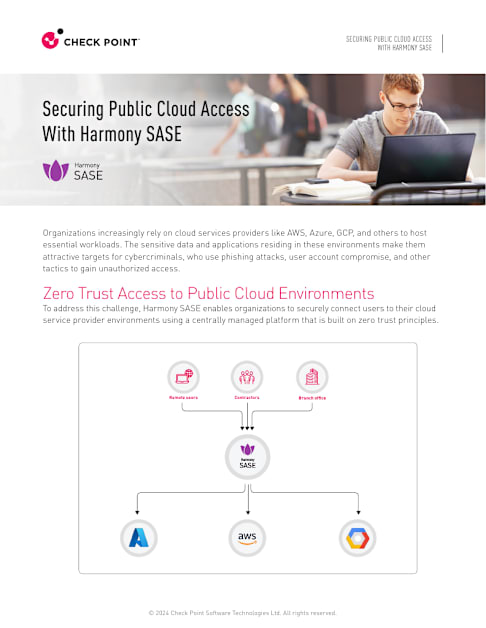
Zero Trust Access to Public Cloud Environments To address this challenge, Harmony SASE enables organizations to securely connect users to their cloud service provider environments using a centrally managed platform that is built on zero trust principles.
Remote users
Contractors
Securing Public Cloud Access With Harmony SASE
© 2024 Check Point Software Technologies Ltd. All rights reserved.
2SECURING PUBLIC CLOUD ACCESS WITH HARMONY SASE
Harmony SASE provides two ways to establish secure access to all of your cloud environments: En- crypted tunnels and IP allowlisting.
Encrypted Tunnels To optimize the protection of your cloud environment, establish an encrypted tunnel between it and your Harmony SASE gateway. This allows your authorized users to connect securely while increasing overall protection by hiding the public IP address of your cloud resources.
Harmony SASE assigns an internal IP address to your virtual private cloud/network in the cloud provider’s environment, thereby obscuring its public IP from the outside world. Internal IP addresses cannot be used outside the network, rendering your cloud resources invisible and inaccessible, and greatly reducing the attack surface.
IP Allowlisting Your Harmony SASE license gives you access to a static IP address to enable allowlisting with the cloud services provider. This is not as secure as implementing a secure tunnel using supported VPN protocols but allowlisting means that only employees coming through your Harmony SASE private IP address will be able to access your cloud resources. To use IP allowlisting, you simply add a firewall rule on the cloud provider side that only allows access via your Harmony SASE gateway’s IP address.
Harmony SASE also implements granular access on a per-user application basis, which ensures users only have access to the specific applications they need, and not the entire virtual private cloud/network.
Harmony SASE Key Advantages • Complete visibility into device inventory and user connectivity • Centrally manage and control of users and devices • Prevent attacks on sensitive data and workloads • Only allow devices that pass a thorough security check to access the cloud environment • Demonstrate compliance with data privacy mandates requiring organizations to limit access
to sensitive data and maintain logs of user and admin access
Worldwide Headquarters 5 Shlomo Kaplan Street, Tel Aviv 6789159, Israel | Tel: +972-3-753-4599
U.S. Headquarters 100 Oracle Parkway, Suite 800, Redwood City, CA 94065 | Tel: 1-800-429-4391
www.checkpoint.com
© 2024 Check Point Software Technologies Ltd. All rights reserved.
3SECURING PUBLIC CLOUD ACCESS WITH HARMONY SASE
Meet Harmony SASE 2x Faster Internet Security | Full Mesh Private Access | Secure SD-WAN
Harmony SASE is a game-changing solution that delivers 2x faster internet security combined with full mesh Zero Trust Access and optimized SD-WAN performance—all with an emphasis on ease-of-use and streamlined management.
Harmony SASE is part of the Harmony for Workspace Suite. Harmony helps organizations of all sizes secure their workspaces with a suite of products including SASE, SaaS protection, email security, endpoint and mobile protection, and in-browser security.
Want to see how Harmony SASE can transform your network security? Book a demo today.